Loupe system design: pins that survive redeploys
Loupe is a visual feedback tool: a person pins a comment to an element of a live page, and an AI agent reads it over MCP. The hard part of its design is that a pin has to survive a redeploy that changes the markup, and that an agent has to be able to act on a comment without ever deciding that the work is finished.

The shape of the system
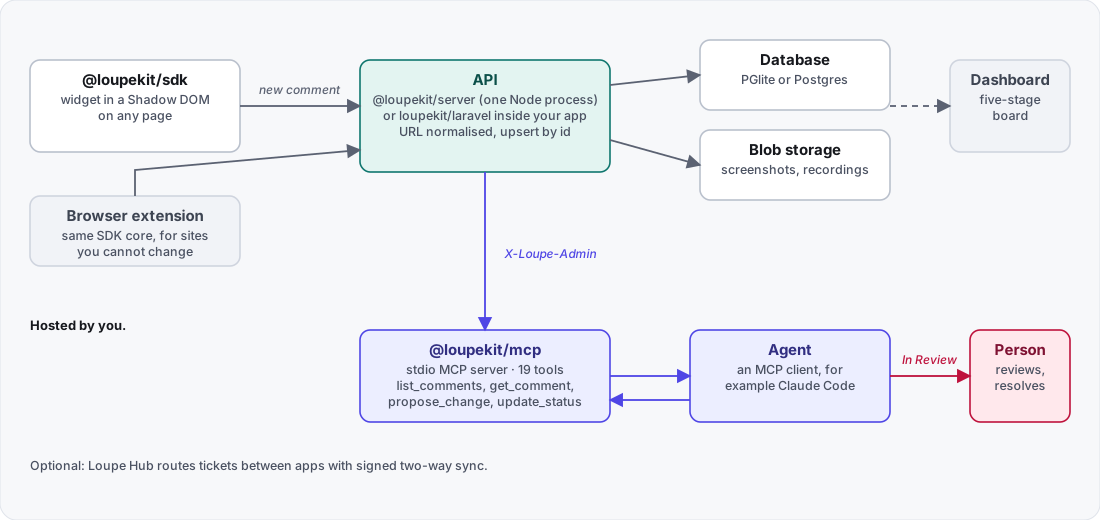
| Component | Runtime | Role |
|---|---|---|
@loupekit/sdk |
Browser | The widget, in a Shadow DOM, on any page |
@loupekit/server |
Node 24 | HTTP API, embedded Postgres (PGlite) or a real one, blobs on disk |
@loupekit/dashboard |
Browser | The five-stage board |
@loupekit/mcp |
Node (24 documented) | A stdio MCP server with 19 tools, plus a local bridge |
@loupekit/extension |
Browser, Manifest V3 | The same SDK core, for sites you cannot change |
loupekit/laravel |
PHP 8.2+ | The API, dashboard and a 4-tool MCP server inside a Laravel app |
Locally one Node process runs the API, the database, the blob storage and the static hosting for the dashboard, demo and SDK bundle. A Laravel app can replace that process. Loupe Hub, a separate server you host, is optional and routes tickets between apps.
A comment’s journey
- Capture. The SDK records an anchor, the element’s outer HTML (up to 6,000 characters), selected computed styles and a screenshot.
- Storage adapter. The widget calls a
StorageAdapter. The HTTP adapter uploads the screenshot toPOST /v1/blobsfirst and posts the comment with the returned URL. If the upload fails it keeps the inline data. An offline adapter writes tolocalStorageinstead. - API. The server checks identity, normalizes the URL and upserts the comment by its client-generated id.
- Dashboard and MCP. People triage on the board. An agent reads the same comments through the MCP server.
- Proposal or pull request. The agent writes back a proposal (HTML, CSS and notes shown as a before-and-after preview) or a pull-request record.
- Review. The agent moves the thread to In Review, and the widget and the board flag it as needing a person.
- Resolve. A person resolves it.
Three credentials keep the paths apart. The widget sends a user identity signed with HMAC (X-Loupe-User and X-Loupe-Hmac). A Laravel app uses its own session and a CSRF token. The MCP server and the dashboard use the project secret in X-Loupe-Admin.
The anchor: a fingerprint, not a selector
A CSS selector breaks the first time a class name changes. Loupe stores several signals about the element, called the anchor, and resolves it again on every load and every DOM change.
| Field | Content |
|---|---|
tag |
Lowercase tag name |
cssPath |
A CSS path rooted at the nearest stable id or test id |
xpath |
An XPath to the element |
testid |
data-testid, data-test or a stable id |
text |
Normalized text, up to 120 characters |
attrs |
role, aria-label, name, type, alt, href, placeholder, title, each up to 200 characters |
nthOfType |
Position among siblings of the same tag |
rect, viewport |
Document position and size, and the viewport at capture time |
Resolving it again
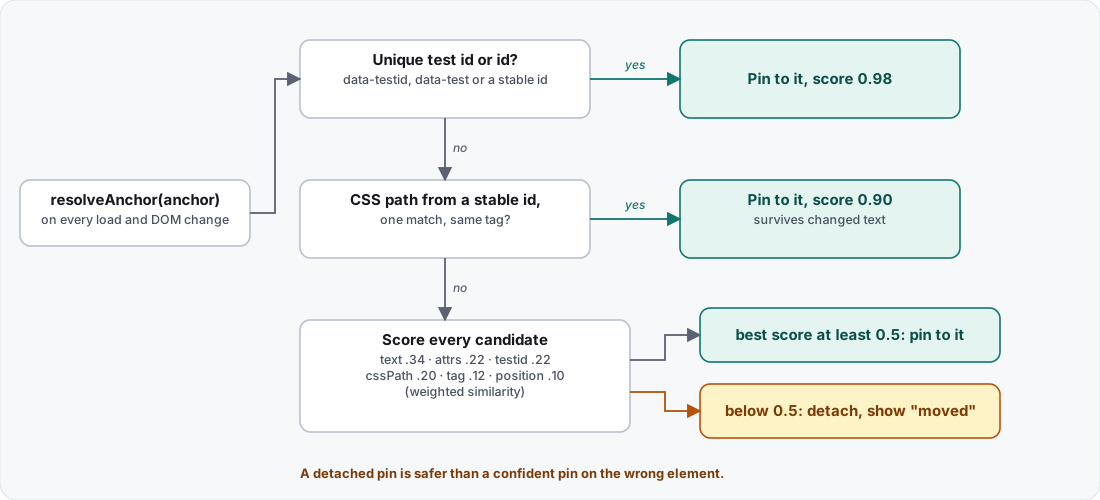
packages/sdk/src/fingerprint.ts.The order is deliberate: strongest signals first.
- A unique test id or id wins at a score of 0.98.
- A CSS path rooted at a stable id, with one match and the same tag, wins at 0.9. This survives changed text.
- Otherwise the elements selected by the CSS path and the XPath, and every element with the same tag, are candidates, and elements with matching text are added until there are more than 4,000. Each is scored by weighted similarity: text 0.34, attributes 0.22, test id 0.22, CSS path 0.2, tag 0.12, position 0.1.
- If the best score is at least 0.5, the pin attaches to that element. Below 0.5 the pin detaches and the list shows a “moved” badge.
The threshold encodes a product decision: the documentation says a detached pin is safer than a confident pin on the wrong element. A confident wrong pin sends a developer to fix the wrong thing, while a detached one asks a person to look. The threshold lowers the chance of a wrong pin; a hit at 0.9 or 0.98, or a score above 0.5, can still be wrong.
Two filters keep the candidates honest. An id that looks framework-generated is ignored: longer than 40 characters, starting with ember, react, radix, headlessui or :r, or containing :. Hidden elements are skipped when the browser supports checkVisibility.
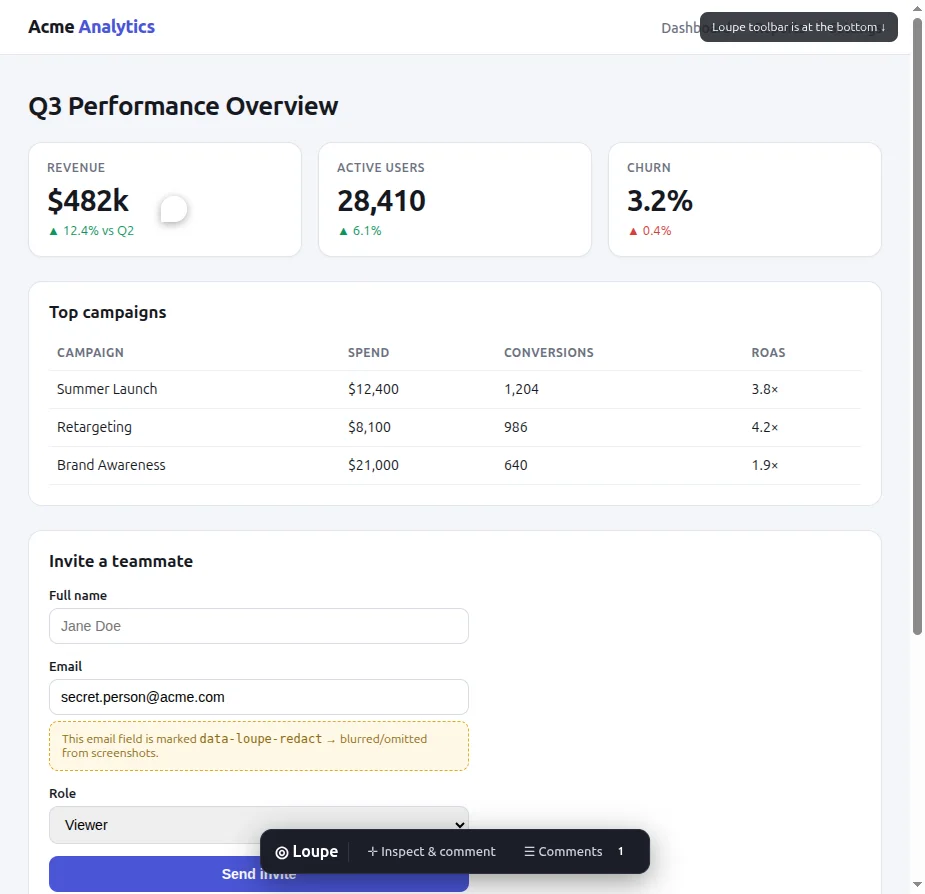
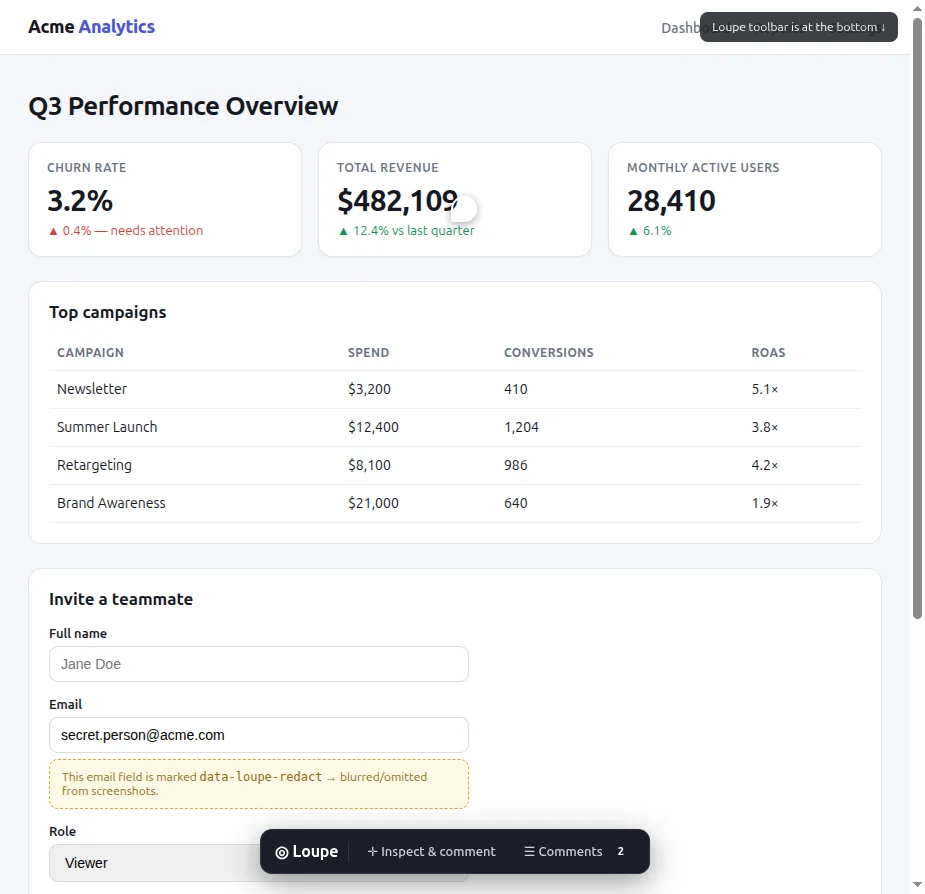
A region comment anchors to the smallest ancestor that covers at least 60% of the region, walking up from the element under the region’s centre. body and html never qualify. The region also stores its rectangle as fractions of that anchor, so it can be placed again after a responsive reflow.
The lifecycle, and who may move it
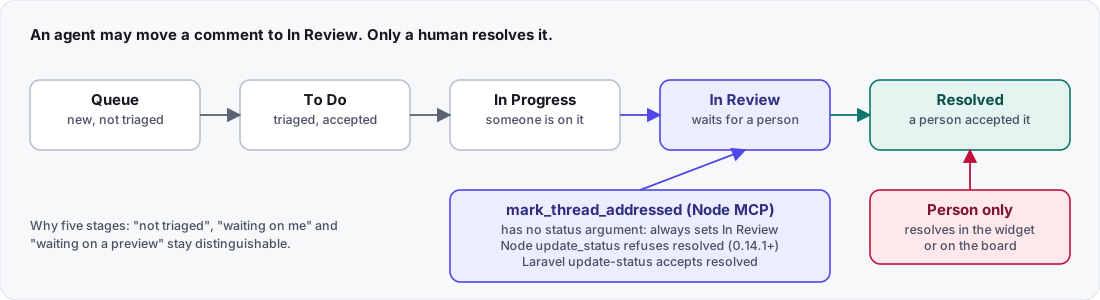
The rule is simple to state: an agent may move a comment to In Review, and only a person resolves it. The Node MCP tools carry it. mark_thread_addressed, the tool built for the handoff, has no status argument and always sets In Review. update_status states the same rule in its description and, since 0.14.1, refuses resolved without changing the comment.
Two caveats. Loupe’s own tutorial says this is an instruction to the agent, not a permission check. And the Laravel package’s update-status tool does not refuse resolved: it accepts it and saves it. In the Node server’s PATCH handler I found no rule on status (I read the code and did not run it).
The widget also decides when a person has to act (needsYou()), in this order:
- A resolved thread never needs anyone.
- A failed agent run: “The agent’s run failed”.
- The agent’s last message ends in a question mark: “The agent asked you something”.
- The thread is In Review: “Waiting on your review”.
A failure outranks a question, and both outrank a routine review.
What redaction covers
Elements marked data-loupe-redact are left out of the screenshots that Loupe’s built-in capture takes. That is images only: the anchor text and the element’s outer HTML (up to 6,000 characters) can still contain the content, and a host that overrides capture has to do its own redaction. Screen recordings capture the real pixels, redacted elements included, and the documentation says so. The Node server and the dashboard run on your machine or on a host you choose, and the comments live in a database you control.
Trade-offs
- Best results need a stable handle. Give important elements a
data-testid. Without one, a pin depends on the tag, CSS path, text, attributes and position, which the documentation treats as weaker signals. - A detached pin costs a person’s attention. That is the price of lowering the chance of pinning to the wrong element.
- The rule that only a person resolves lives in the Node MCP tools, not in the Node server’s status handler, and not in Laravel’s
update-statustool.
What I checked, and what I did not
I read the anchor constants in packages/sdk/src/fingerprint.ts on a clone of Loupe 0.14.2 on 2026-10-31: the 0.98 and 0.9 scores, the 0.5 acceptance threshold and the way a unique test id and a CSS path are tried first. The architecture document describes 0.14.1, so the tool names and stage rules here come from that document. I started the local server from that clone and loaded the demo page and the dashboard.
I read the status handler and the Laravel tool in the source and did not run them. I did not run the Hub’s two-way sync, the Laravel package or the browser extension for this post, and I did not test re-anchoring on a real redeploy of my own site. The before and after images come from Loupe’s own documentation.
What I would do differently
- Enforce the review rule on the server as well. Today the Node tools carry it, and the tutorial calls it an instruction to the agent, not a permission check. Laravel’s tool accepts
resolvedtoday. - Tell teams about
data-testidbefore the first comment. The scoring is designed to survive change, but a stable handle is the strongest signal, and it costs a team one attribute.
Sources
- Loupe architecture, fetched 2026-10-31
- Loupe source, anchor fingerprint, fetched 2026-10-31
- Loupe tutorial, pin your first comment and hand it to Claude Code, fetched 2026-10-31
- Model Context Protocol, what is MCP?, fetched 2026-10-31
